


Dive into local AI for more than five minutes and you’ll start tripping over words like GGUF, quantization, parameters, context window, inference tossed around as if everyone already gets it. Nobody explains them upfront, which is annoying, because these aren’t just buzzwords. They actually decide how a model behaves on your computer: how much RAM it eats, how fast it responds, how sharp or sloppy its answers end up being.
The good news? None of this requires a technical background to understand. Once the terms click, choosing a model for your setup goes from guessing games to something you can actually reason through. Parameters give you a rough sense of how smart and how heavy a model is. Quantization is what lets you compress that model down without gutting its quality.
GGUF is the format that makes running these models on regular hardware even possible. Context window caps how much the model can hold onto during a conversation. And inference is simply the model doing its job: turning your input into a response.By the end of this, you’ll know exactly what you’re looking at when you’re picking a model, not just downloading the biggest one and hoping for the best.
What Is an AI Model, Exactly?
The AI model is really the heart of the whole local AI setup; it’s the thing actually generating the responses you see. During training, it chews through enormous amounts of text, code and other data and picks up patterns from all of it. So rather than looking anything up online, it’s essentially predicting what token comes next based on whatever you’ve typed in.
A decent way to think about it: if an AI runner like Ollama or LM Studio is the car, the model is the engine. Take the engine out and the car’s not going anywhere the software has nothing to actually run. Not all models are built for the same thing, either. Some are tuned for writing, others lean into coding, math, reasoning, working across languages or digging through documents.
Picking the right one for your needs matters just as much as having the hardware to run it, maybe more.The good news is there’s no shortage of options. The open source community has put out a ton of solid models at this point and pretty much anyone can grab one and start running it locally.
Some of the most popular include:

Each model has different strengths. A model that performs well for software development may not be the best choice for creative writing, while a lightweight model designed for laptops may respond faster than a much larger model.
Understanding Model Parameters
When browsing AI models on Hugging Face, you’ll often see names such as:
- Llama 3 8B
- Gemma 7B
- Gwen 14B
- DeepSeek-R1 32B
The number followed by “B” refers to billions of parameters.
Parameters are the values the model learned during training. They allow the model to recognize language patterns, solve problems, generate code and answer questions.
In general:
- More parameters increase the model’s knowledge and reasoning ability.
- More parameters also require more computing resources and memory.
A larger model is not always the better choice. The right model depends on your workload, response speed and available hardware.

For many people, 7B or 8B models provide the best balance between quality and performance. They can write articles, summarize documents, answer questions and assist with programming without requiring enterprise hardware.
Choosing the Right AI Model
Instead of selecting the largest model available, match the model to your primary task.
| Task | Recommended Models |
| Writing and content creation | Llama 3, Gemma |
| Software development | DeepSeek-R1, Llama 3 |
| Research | Gwen, DeepSeek-R1 |
| Multilingual communication | Gwen |
| Everyday productivity | Gemma, Phi-3 |
| Lower spec computers | Phi-3, Gemma |
For example:
- A freelance writer benefits from Llama 3 because it produces natural, well structured text.
- A software engineer may prefer DeepSeek-R1 because it performs strongly on coding and logical reasoning tasks.
- Someone using an older laptop can start with Phi-3, which is designed to perform well on modest hardware.
The goal is to choose a model that matches your work rather than simply downloading the largest one.
Understanding GGUF and GGML
Once you’ve selected a model, you’ll notice that it is available in different file formats.
The two names you’ll encounter most often are GGUF and GGML.
These are not different AI models. Instead, they are formats used to store and run the model efficiently.
Also Read: https://browsora.com/how-to-optimize-local-ai-performance-faster-inference/
What Is GGUF?
GGUF (GPT-Generated Unified Format) is the modern file format used by many local AI tools.

It stores:
- Model weights
- Metadata
- Tokenizer information
- Configuration settings
GGUF is designed for fast local inference and broad compatibility. It is supported by popular AI runners and inference engines, making it the preferred choice for most users.
Benefits of GGUF
- Faster loading times
- Better compatibility with modern AI software
- Efficient memory usage
- Easy distribution through model repositories
Because of these advantages, most new open source AI models provide GGUF downloads alongside other formats.
What Is GGML?
GGML is an older model format that helped popularize local AI. It introduced efficient CPU based inference and made it possible to run language models on consumer hardware.
While GGML played an important role in the growth of local AI, many projects have now moved to GGUF because it offers greater flexibility and improved support for newer features.
If both formats are available, GGUF is generally the recommended choice for new installations.
Downloading Models from Hugging Face
Most open source AI models are distributed through Hugging Face, one of the largest repositories for machine learning projects.
A model page typically includes:
- Different parameter sizes
- Multiple GGUF files
- Quantized versions
- Documentation
- Community updates
- Usage recommendations
Before downloading a model, check:
- The model size
- Available file formats
- Hardware recommendations
- Licensing terms
- Community feedback
Choosing the correct version from the beginning helps you avoid compatibility issues and unnecessary downloads.
Understanding Quantization
One of the first things you’ll notice when downloading a local AI model is that it comes in several versions, such as Q4_K_M, Q5_K_M, Q6_K or Q8_0. These versions use quantization, a technique that reduces the model’s size without changing its architecture.
In simple terms, quantization compresses a model so it uses less memory and runs faster on consumer hardware. Instead of storing every value with high precision, the model stores values more efficiently while preserving most of its quality.
This makes it possible to run powerful AI models on laptops and desktop computers that otherwise couldn’t handle them.
Why Quantization Matters
Without quantization, many large language models would require enterprise grade hardware. By reducing memory requirements, quantized models become practical for everyday users.
The main benefits are:
- Smaller download size
- Lower memory usage
- Faster loading times
- Better compatibility with consumer hardware
- More efficient local inference
The trade off is that aggressive compression can slightly reduce response quality. For most writing, coding and productivity tasks, however, the difference is often difficult to notice.
Q4 vs Q6 vs Q8: Which Version Should You Choose?
Different quantization levels balance performance and quality differently.
| Quantization | Memory Usage | Speed | Response Quality | Best For |
| Q4 | Low | Very Fast | Good | Most users |
| Q5 | Medium | Fast | Very Good | Balanced performance |
| Q6 | Higher | Moderate | Excellent | Professional work |
| Q8 | Highest | Slower | Near original model | High end systems |
Q4
Q4 models are the most popular choice because they provide an excellent balance between quality and efficiency. They work well for writing, research, coding and everyday conversations while using relatively little memory.
Q6
Q6 models retain more of the original model’s precision. They require additional memory but often produce slightly more consistent responses, especially during complex reasoning tasks.
Q8
Q8 models are close to the original model in quality but require significantly more memory. They are best suited for powerful workstations where maximizing output quality is more important than minimizing resource usage.
Recommendation: If you’re new to local AI, start with a Q4 version. You can always try Q6 or Q8 later if your hardware allows it and your workload benefits from the extra precision.
FP16 vs FP32
Besides quantized versions, you may also see models labeled FP16 or FP32.
FP stands for Floating Point, a method used to represent numerical values inside an AI model.
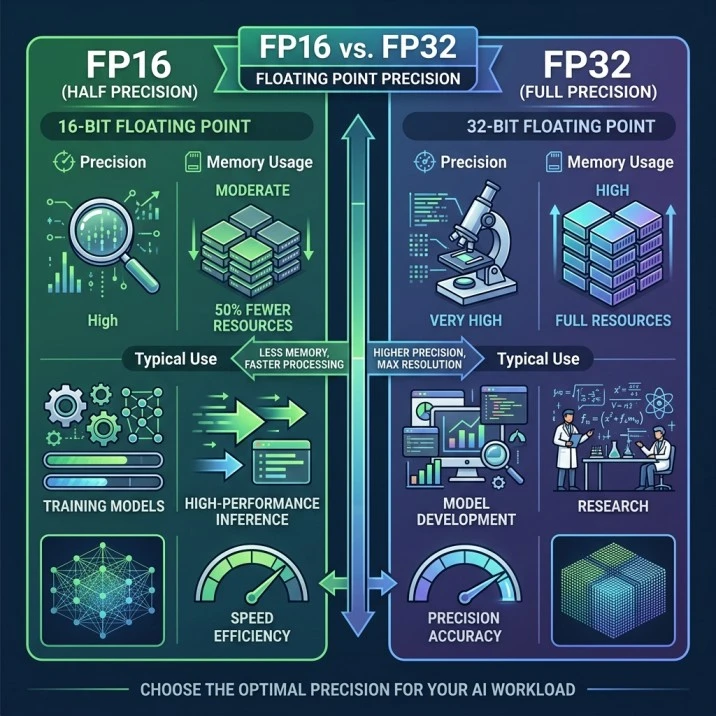
These formats are primarily used by researchers and developers. Most users running AI locally will download a GGUF model that has already been quantized, making FP16 and FP32 something you should understand rather than regularly choose.
What Is AI Inference?
Training teaches an AI model how to understand language. Inference is the stage where the trained model generates responses.
Every time you type a prompt, the model performs inference by predicting one token after another until it completes the response.
Inference speed depends on several factors, including:
- Model size
- Quantization level
- Available hardware
- Prompt length
Although hardware affects how fast inference runs, the inference process itself is part of how the model operates.
Understanding Tokens
AI models do not process complete sentences all at once. Instead, they break text into tokens, which are small units of language.
A token may be:
- Part of a word
- A complete word
- A number
- Punctuation
For example:
Prompt
Explain local AI in simple words.
The model processes this prompt as a sequence of tokens before generating its response.
Token usage affects:
- Response length
- Memory requirements
- Processing time
Many AI tools display token counts so users can estimate resource usage and conversation length.
What Is the Context Window?
The context window is the amount of information an AI model can remember during a conversation.
It includes:
- Your current prompt
- Previous messages
- Instructions
- Uploaded text
A larger context window allows the model to understand longer conversations and larger documents without forgetting earlier information.
For example:
| Context Window | Suitable For |
| 4K | Short chats |
| 8K | General conversations |
| 32K | Long reports and documents |
| 128K+ | Large research projects and books |
Choosing the right context window depends on your workflow. Larger context windows improve memory but usually require more computing resources.
What Is KV Cache?
The KV Cache (Key Value Cache) helps an AI model remember previously processed tokens during inference.
Instead of recalculating every token from the beginning, the model stores important information in the cache and reuses it while generating new text.
This improves:
- Response speed
- Efficiency
- Long conversation handling
Although most AI runners manage the KV Cache automatically, understanding its role helps explain why long conversations consume additional memory.
How to Choose the Right AI Model
Instead of selecting the largest or newest model, choose one that fits your goals.
Your Goal |
Recommended Model |
| General writing | Llama 3 |
| Coding | DeepSeek R1 |
| Business documents | Gwen |
| Everyday productivity | Gemma |
| Older computers | Phi-3 |
| Fast responses | Mistral |
If you’re just starting, a 7B or 8B model in GGUF format with Q4 quantization is usually the easiest and most practical option.
Key Takeaways
- AI models are the intelligence behind local AI applications.
- Model parameters indicate the model’s size and capability.
- GGUF is the preferred format for running modern AI models locally.
- Quantization reduces model size while maintaining most of its quality.
- Q4 provides the best balance for most users.
- Inference is the process of generating responses after training.
- Tokens, context windows and KV Cache determine how the model processes and remembers information.
- Select a model based on your task rather than simply choosing the largest available version.
Frequently Asked Questions
What do 7B and 13B mean?
They represent the approximate number of billions of parameters in an AI model. Larger models generally provide stronger reasoning but require more computing resources.
What is GGUF?
GGUF is a modern file format that stores AI models for efficient local inference and broad compatibility with popular AI runners.
Is GGUF better than GGML?
For most users, yes. GGUF supports newer features, better metadata and improved compatibility with current local AI software.
Which quantization should beginners choose?
A Q4 version is usually the best starting point because it balances speed, memory usage and response quality.
What is inference?
Inference is the process of generating answers from a trained AI model after you submit a prompt.
What is a context window?
A context window is the amount of text an AI model can remember while generating responses.
Does a larger model always produce better answers?
Not always. A model should match your workload, available hardware and performance needs. Many users find that smaller, well optimized models provide the best overall experience.
Conclusion
At this point, terms like GGUF, quantization, parameters, context window and inference shouldn’t feel like a foreign language anymore. They’re really just different pieces of the same puzzle together, they decide whether a model runs smoothly on your setup or grinds it to a halt.
The takeaway isn’t “bigger is always better.” It’s about matching a model to what your hardware can actually handle. Get that balance right and you’ll get fast, reliable results without your system struggling under the weight of something it was never built to run. Get it wrong and even a powerful setup can feel sluggish and unresponsive.

Zafar Iqbal is a content and blog writer specializing in technology, artificial intelligence, software and digital trends. He holds a Master’s degree in English Literature from the University of the Punjab, Lahore, which shapes his approach to clear, well-structured writing. Zafar focuses on breaking down complex technical subjects into content that is easy to follow without sacrificing accuracy or depth. His work draws on careful research, attention to detail and a practical understanding of SEO content strategy and keyword research ensuring articles are both informative and easy to find. He is particularly interested in how emerging technologies affect everyday users and works to present that information in a way that is useful rather than overwhelming. His writing aims to give readers a clear, reliable understanding of the topics that shape modern technology.
Leave a Reply